GTREND SPOT FOR GUNBOT ALREADY OWNERS click for more info
Couldn't load pickup availability
🎁 Already Purchased GTREND?
If yes, send us a message to add you to the private group for quick setups, advanced strategies, private support, and exclusive updates
🎯 WELCOME TO GTREND STRATEGIES
https://www.youtube.com/@Ai-Markets_Shop
💰 SPOT GTREND STRATEGIES
Automated Setup Guide
Perfect for: Beginners & Intermediate Traders
Set just 5 parameters and let the algorithm handle everything else. The system automatically adjusts timeframes, trading limits, and DCA orders based on your BULLETS configuration.
Key Features:
- ✅ Only few settings needed
- ✅ Automatic timeframe optimization
- ✅ Smart DCA distribution
- ✅ Capital preservation
Custom Setup Guide
Perfect for: Advanced Traders
Full control over all strategy parameters. Manually configure timeframes, trading limits, trend filters, and pump/dump detection settings to match your exact trading strategy.
Key Features:
- ⚙️ Complete parameter control
- ⚙️ Manual timeframe configuration
- ⚙️ Custom trend filter settings
- ⚙️ Advanced pump/dump detection tuning
📈 FUTURES GTREND STRATEGIES
Automated Futures Guide
Status: In Development
Automated futures trading with leverage management, automated stop-loss, and position sizing based on account risk parameters.
Custom Futures Guide
Status: In Development
Advanced futures trading with full manual control over leverage, margin, liquidation protection, and risk management parameters.
🔗 Quick Navigation Links
| Resource | Description | Link |
|---|---|---|
| 🤖 Automated Spot Guide | Quick setup for automated trading | |
| ⚙️ Custom Spot Guide | Advanced manual configuration | |
| 🚀 Automated Futures Guide | Automated futures setup (Coming Soon) | |
| ⚡ Custom Futures Guide | Advanced futures configuration (Coming Soon) | |
| 💬 Telegram Support | Direct support on Telegram | ✈ Contact Developer |
© 2024 AI Markets Shop - GTREND Trading Strategies
🎁 Already Purchased GTREND?
If yes, send us a message to add you to the private group for quick setups, advanced strategies, private support, and exclusive updates
QUICK GUIDE: GTREND SPOT AUTOMATED ALGORITHM SYSTEM SETUP
📺 Watch the Complete Setup Tutorial
Learn how to configure the automated GTREND strategy step-by-step
▶ Watch Video TutorialOnly 1 Setting Required to Start!
The rest are optional for fine-tuning
Note: You can start trading with just the MAX_INVESTMENT setting! The algorithm uses optimized defaults for all optional parameters.
⚙️ AUTOMATED ALGORITHM - ADJUSTABLE PARAMETERS
| Parameter | Status | Default | Description |
|---|---|---|---|
|
MAX_INVESTMENT
FOR_THIS_PAIR
|
REQUIRED | 1000 |
Set the total amount allocated to this specific pair from your wallet. This is the maximum capital the system will use for this trading pair.
⚡ This is the ONLY required setting to start trading!
|
|
BULLETS
DCA Orders
|
OPTIONAL | Auto |
Maximum number of DCA (Dollar Cost Averaging) orders. Algorithm uses optimal defaults if not set.
10-20: Swing
21-35: Balanced
36-50+: Scalping
The system divides MAX_INVESTMENT by BULLETS for order sizing. Designed to withstand 60%+ drops.
|
|
TRADING_LIMIT
MULTIPLIER
|
OPTIONAL | 1 | Multiplier to increase buying power. Setting to 2 doubles your position sizes without changing displayed limits. |
|
BEP_TAKE_PROFIT
Break-Even %
|
OPTIONAL | 0.5% |
Minimum % above break-even to close full position on red candle confirmation.
Default ensures safe minimum profit targets.
|
|
GAIN_PARTIAL
Partial Profit %
|
OPTIONAL | 0.5% |
Minimum profit % for partial orders below break-even. Closes on red candle confirmation.
Ensures minimum profit on partial exits.
|
💡 TRADING STYLE SELECTION GUIDE
Swing Trading
10-20 BULLETSBalanced Trading
21-35 BULLETS DEFAULT RANGEActive Scalping
36-50+ BULLETS📊 Understanding BULLETS Impact (Optional Setting)
- ✓ Fewer, larger trades
- ✓ Less scalping activity
- ✓ Captures bigger movements
- ✓ Works great in trending markets
- ✓ Balanced trade sizes
- ✓ Moderate scalping
- ✓ Good for mixed conditions
- ✓ Versatile approach
- ✓ Many small trades
- ✓ Maximum scalping
- ✓ Better price averaging
- ✓ Excellent for volatility
You don't need to set BULLETS to start! The algorithm uses intelligent defaults. When you're ready to customize:
- • Available capital (smaller accounts benefit from higher BULLETS)
- • Market conditions (volatile = higher, trending = lower)
- • Risk tolerance (more BULLETS = better risk distribution)
- • Trading preference (active vs. passive approach)
📊 AUTOMATED ALGORITHM VISUALIZATION
No values can be modified here - they are automatically calculated by the algorithm based on your BULLETS configuration.
📖 Column Abbreviations Reference
📈 Automated Algorithm Configuration Table
| BULLETS Range | Exchange Type | TF/Period (min) | GRPR | MSP | MIOD | GA | GG | GR | TL | ITL |
|---|---|---|---|---|---|---|---|---|---|---|
| 1-5 | All | 5-30 | 10080 | 10080 | 3 DCA | 5 | 30 | 30 | MIP/B | MIP/B |
| 6-10 | All | 5-30 | 10080 | 10080 | 3 DCA | 5 | 30 | 30 | MIP/B | MIP/B |
| 11-15 | Excluded | 5-15 | 4320 | 4320 | 3 DCA | 5 | 15 | 15 | MIP/B | MIP/B |
| 11-15 | Standard | 5-15 | 1440 | 1440 | 3 DCA | 5 | 15 | 15 | MIP/B | MIP/B |
| 16-20 | All | 5-15 | 1440 | 1440 | 3 DCA | 5 | 15 | 15 | MIP/B | MIP/B |
| 21-25 | All | 5-15 | 720 | 720 | 3 DCA | 5 | 15 | 15 | MIP/B | MIP/B |
| 26-30 | All | 5-15 | 360 | 360 | 3 DCA | 5 | 5 | 15 | MIP/B | MIP/B |
| 31-35 | All | 1-15 | 240 | 240 | 3 DCA | 1 | 5 | 15 | MIP/B | MIP/B |
| 36-40 | All | 1-15 | 60 | 60 | 3 DCA | 1 | 5 | 15 | MIP/B | MIP/B |
| 41-45 | All | 1-5 | 30 | 30 | 3 DCA | 1 | 1 | 5 | MIP/B | MIP/B |
| 46-50 | All | 1-1 | 15 | 15 | 3 DCA | 1 | 1 | 1 | MIP/B | MIP/B |
| 51+ | All | 1-1 | 1-5 | 1-5 | 3 DCA | 1 | 1 | 1 | MIP/B | MIP/B |
🏦 Exchange Type Classification
⏱️ Timeframe/Period Reference Guide
🎯 LIVE DEMO – Automated Setup
See the automated GTREND algorithm in action with real-time trading data
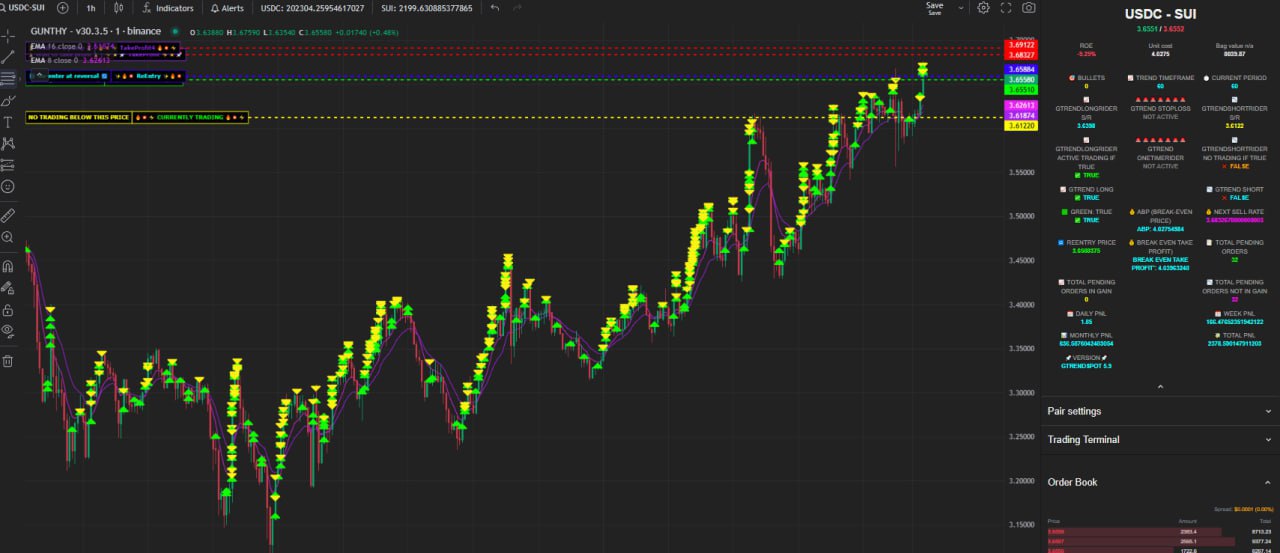
🔹 LIVE DEMO 1 – Automated Setups
Real-Time Automated Trading Dashboard
Watch the automated GTREND algorithm manage positions with minimal configuration. This demo shows real trading data from active pairs using automated settings.
ℹ️ This demo shows real trading data updated in real-time. Performance may vary based on market conditions.
🎁 Already Purchased GTREND?
If yes, send us a message to add you to the private group for quick setups, advanced strategies, private support, and exclusive updates
QUICK GUIDE: GTREND SPOT CUSTOM SETUP
📺 Watch the Advanced Setup Tutorial
Master the custom configuration of GTREND parameters
Watch for different setups to maximize profits
Complete Control
Manually configure every parameter for maximum flexibility
Advanced Settings
Fine-tune timeframes, stop-loss, and trend filters
Expert Level
For experienced traders who understand market dynamics
⚙️ CUSTOM MODE - FULL PARAMETER CONTROL
🚀 Quick Reference Guide
📋 CUSTOM PARAMETERS CONFIGURATION TABLE
| Parameter | Default Value | Description |
|---|---|---|
| MAX_INVESTMENT_FOR_THIS_PAIR | 1000 | Set the total amount allocated to this specific pair. This is the maximum capital the system will use for this trading pair. In custom mode, you must manually ensure this aligns with your risk management. |
| BULLETS | 0 | Must be set to 0 for custom mode. Setting BULLETS to 0 disables automated algorithm adjustments and enables full manual control. If BULLETS > 0, automated setup is used and the system will automatically configure all parameters. |
| 💰 TRADING LIMITS | ||
| TRADING_LIMIT_MULTIPLIER | 1 | Multiplier to increase buying power. If your trading limit is 50 and you set this to 2, the system will purchase 100 worth. |
| INITIAL_TRADING_LIMIT | 1000 | The initial trading limit for your first buy order. This sets the base order size before any DCA orders. Should always match TRADING_LIMIT. |
| TRADING_LIMIT | 1000 | Current trading limit for orders. Determines order size for each buy. Should always match INITIAL_TRADING_LIMIT - both values must be identical. |
| 📊 PRIMARY TRENDS TIMEFRAMES/PERIODS | ||
| PERIOD | 1440 | Main timeframe/period in minutes for trading analysis. 1440 = 1 day. This is your primary trading timeframe for candle analysis. |
| MICROSCALPING_PERIOD | 1440 | Sub timeframe / secondary timeframe filter trend - Controls secondary trend analysis. Can be shorter than PERIOD for more responsive signals. |
| GTREND_REST_PERIOD_RIDER | 1440 | Main higher trend filter - This is the main trend we follow as the primary higher timeframe trend. Controls the primary trend analysis window. |
| ⚠️ PUMP/DUMP MODULES | ||
| GTREND_ACTIVE_PERIOD | 1440 | Pump/Dump detection module - Timeframe for active trend detection. To DISABLE pump/dump module: Set the same timeframe on all 3 pump/dump parameters (ACTIVE, GAIN, REST). Any different values will ENABLE the module. |
| GTREND_GAIN_PERIOD | 1440 | Pump/Dump detection module - Timeframe for gain analysis. Works with GTREND_ACTIVE_PERIOD to detect rapid price movements. To DISABLE: Set same as ACTIVE and REST periods. |
| GTREND_REST_PERIOD | 1440 | Pump/Dump detection module - Timeframe for rest/consolidation detection. Identifies when trends are resting or consolidating. To DISABLE: Set same as ACTIVE and GAIN periods. |
| 📏 SETTINGS BASED ON % (use chart ruler to measure) | ||
| BEP_TAKE_PROFIT | 0.5 | Percentage above break-even price to close full position. Value in percentage (0.5 = 0.5%). If TREND_TAKEPROFIT = true: Takes profit on trend reversal/red candle confirmation. If TREND_TAKEPROFIT = false: Takes profit instantly as market crosses the set %. |
| GAIN_PARTIAL | 0.5 | Profit percentage to take on partial orders below break-even. Value in percentage. If TREND_TAKEPROFIT = true: Closes on trend reversal/red candle confirmation. If TREND_TAKEPROFIT = false: Takes profit instantly as market crosses the set %. |
| MAX_INVESTMENT_ONE_TIME_DROP | 0.5 | Percentage the market needs to drop in order to re-enter (minimum drop required). Value in percentage (0.5 = 0.5%). If TREND_TAKEPROFIT = true: Requires candle reversal confirmation. If TREND_TAKEPROFIT = false: Re-enters instantly as it crosses the set %. |
| 🛡️ STOPLOSS FILTERS | ||
| GTREND_ONETIME_RIDER | false | Enable/disable one-time rider feature. When true, allows special one-time position adjustments during extreme market conditions. |
| GTREND_RIDER_STOPLOSS | true | Enable/disable rider stop-loss protection. When true, activates trailing stop-loss on profitable positions to protect gains. |
| GTREND_RIDER_STOPLOSS_SWING | true | Enable/disable swing-based stop-loss. When true, adjusts stop-loss based on price swing highs/lows for better protection. |
| GTREND_RIDER_STOPLOSS_PERIOD | 1440 | Timeframe/period for stop-loss calculations in minutes. Determines lookback period for stop-loss level calculations. |
| 📉 Bollinger Bands Stoploss Filter | ||
| BB_TREND_SCALPS | false | Enable/disable Bollinger Bands (BB) filter. When true, uses BB signals for entry/exit timing within the main trend. When false, BB filter is disabled. |
| SMAPERIOD | 5 | Simple Moving Average period for Bollinger Bands calculations. Only used when BB_TREND_SCALPS = true. Shorter periods = more responsive, longer = smoother. |
| STDV | 1 | Standard deviation multiplier for Bollinger Bands. Only used when BB_TREND_SCALPS = true. Higher values = wider bands, lower values = tighter bands. |
| TREND_TAKEPROFIT | true | Critical setting that affects BEP_TAKE_PROFIT, GAIN_PARTIAL, and MAX_INVESTMENT_ONE_TIME_DROP behavior. When true: Takes profit based on trend reversal/red candle confirmation signals. When false: Takes profit instantly as price crosses the set percentage targets. |
| BUY_ENABLED | true | Master buy switch. Set to false to disable all buying (sell-only mode). Set to true to enable buy orders. |
⏱️ TIMEFRAME/PERIOD REFERENCE
| Minutes | Time Period | Use Case | Trading Style |
|---|---|---|---|
| 1 | 1 minute | Ultra-fast scalping | Scalping |
| 5 | 5 minutes | Fast scalping | Scalping |
| 15 | 15 minutes | Quick trades | Scalping |
| 30 | 30 minutes | Short-term trading | Intraday |
| 60 | 1 hour | Hourly analysis | Intraday |
| 240 | 4 hours | Short swing | Swing |
| 360 | 6 hours | Mid-term swing | Swing |
| 720 | 12 hours | Daily swing | Swing |
| 1440 | 1 day | Daily analysis | Position |
| 4320 | 3 days | Multi-day trends | Position |
| 10080 | 1 week | Weekly trends | Position |
📊 TREND_TAKEPROFIT MODE COMPARISON
| Feature | TREND_TAKEPROFIT = true | TREND_TAKEPROFIT = false |
|---|---|---|
| BEP_TAKE_PROFIT | Waits for red candle confirmation | Exits instantly at target % |
| GAIN_PARTIAL | Closes on trend reversal signal | Takes profit immediately |
💡 KEY CONFIGURATION TIPS
- TREND_TAKEPROFIT = true (Recommended): Waits for trend reversal/red candle confirmation before taking profits or re-entering. More conservative, reduces false signals.
- TREND_TAKEPROFIT = false: Takes action immediately when price crosses percentage thresholds. More aggressive, faster execution but more false signals.
- To DISABLE: Set GTREND_ACTIVE_PERIOD, GTREND_GAIN_PERIOD, and GTREND_REST_PERIOD to the SAME value (e.g., all = 1440)
- To ENABLE: Set different values for these three parameters to activate pump/dump detection
- TRADING_LIMIT and INITIAL_TRADING_LIMIT must ALWAYS be identical
- BULLETS = 0 for custom mode, BULLETS > 0 for automated mode
- GTREND_REST_PERIOD_RIDER is your main higher trend - this is the primary trend you follow
- MICROSCALPING_PERIOD is your secondary/sub timeframe trend filter
🎯 LIVE DEMOS – Custom Setups
See advanced custom GTREND configurations in action with real-time trading data
🔹 LIVE DEMO 2 – Stoploss Protection
Advanced Stop-Loss Configuration
See how GTREND's advanced stop-loss mechanisms protect your capital during market volatility. This demo showcases custom settings with rider stop-loss features enabled.
🔹 LIVE DEMO 3 – Custom Setups
Advanced Custom Configuration
Explore advanced custom configurations with manual parameter control. This demo shows custom timeframe settings, trend filters, and manual DCA management.
Real-Time Trading Data: Both demos show actual trading performance updated in real-time. Results may vary based on market conditions and your specific custom settings.
Custom mode is complex. If you're unsure about any parameter, please contact support or switch to Automated Mode for safer, easier trading.
✈ Contact Developer on Telegram
© 2024 AI Markets Shop - GTREND Trading Strategies
🎁 Already Purchased GTREND? Get Exclusive Access!
Join our private groups for quick setups, advanced strategies, premium support, and exclusive updates
🛒 PURCHASE GTREND STRATEGIES
🏪 AI Markets Shop
Purchase GTREND strategies for existing Gunbot owners
🤖 GTREND Spot Strategy
Advanced spot trading strategy with automated and custom modes. Perfect for both beginners and advanced traders.
Buy from AI Markets Shop🚀 GTREND Futures Strategy
Professional futures trading strategy with leverage management and advanced risk controls.
Buy from AI Markets Shop🎯 Gunbot Lifetime License
Get your Gunbot lifetime license with GTREND strategies. One-time payment, lifetime updates and support included.
Visit gtrend.gunbot.com🎯 Gunbot.com
Purchase from the official Gunbot marketplace
🎯 Gunbot Lifetime License
Trading bot platform required to run GTREND strategies. Lifetime license with free updates.
Visit gtrend.gunbot.com🤖 GTREND Spot Strategy
Purchase GTREND Spot directly from Gunbot's official marketplace.
Buy from Gunbot.com🚀 GTREND Futures Strategy
Purchase GTREND Futures directly from Gunbot's official marketplace.
Buy from Gunbot.com© 2024 AI Markets Shop - GTREND Trading Strategies
Share